Product · India

Everything your food business runs on, in four parts.

Orders and customers, kitchen operations, payments, and growth — connected, so each order flows from the customer to the kitchen to the money to your insights.

01

Orders and customers

The problem: Orders arrive in chats and calls, and the details get lost.

How ChefSathi helps

  • Your own ordering page: Customers open it through a secure link — no app to download, no marketplace.
  • Tiffin subscriptions: Customers sign up for a tiffin plan from your link and skip or pause from their account. Each day's orders are made for you; customers pay meal by meal or by weekly or monthly bill.
  • Every way you sell: Regular orders, tiffin plans, catering enquiries and Specials, each when your kitchen offers it.
  • Customer profiles: Each customer's orders, history and balance in one place.
  • Changes under your rules: Customers can revise or cancel when you allow it; you can too.
More details
  • WhatsApp to link: Customers start on the number they already know.
  • Customize & checkout: Variants, add-ons, delivery or pickup, and live totals.
  • Account: Current orders, balance, and history without calling the owner.
  • Self-service revise: Fix an order early when your rules allow it.
  • UPI proof upload: Pay and send a screenshot in one flow when manual UPI is enabled.
  • Tiffin portal: Pause, skip, or manage plans without a phone call.
  • Tiffin & catering: Plans, enquiries, and event orders on the same customer record.
02

Kitchen operations

The problem: Cooking from a chat scroll means missed items and late orders.

How ChefSathi helps

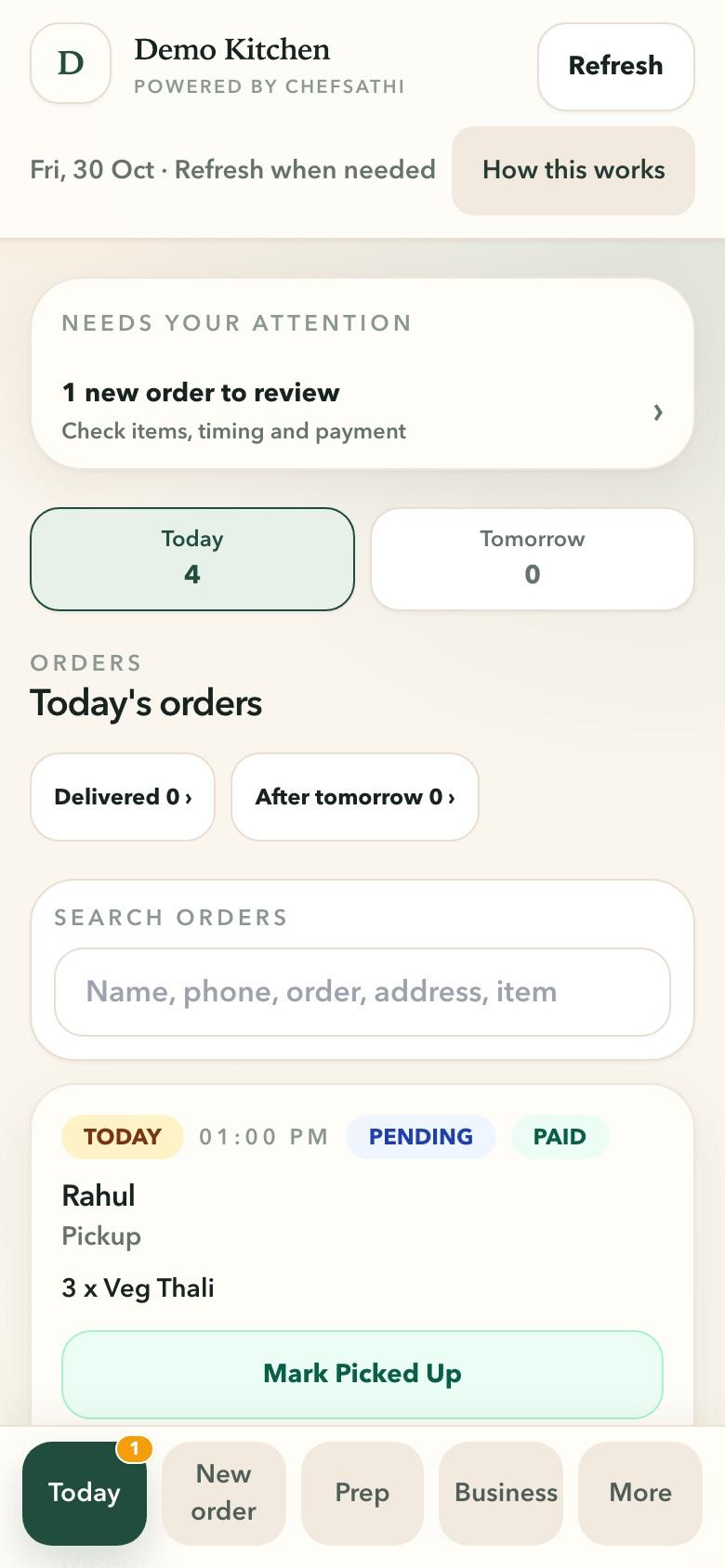
  • Today's orders: New orders to review and everything due today, sorted by time.
  • Prep: What to cook, by delivery time, with notes on each order.
  • Your menu, your way: Publish a daily menu, or run a fixed menu with sizes, options and add-ons.
  • Delivery or pickup: Mark orders ready, out for delivery, picked up or delivered from your phone.
More details
  • Today: What needs your attention, orders to confirm, orders booked ahead and money to follow up, on one screen.
  • Kitchen progression: Accept, mark ready, mark delivered, and correct mistaken delivery.
  • New order: Take a phone or walk-in order yourself, with options and the right total.
  • Daily planner: Set what is available today without rebuilding the whole catalog.
  • Catalog: Products, variants, modifier groups, and availability controls.
  • Import & export: Bulk catalog updates without retyping every item.
  • Specials & campaigns: Limited-time menus and pre-order surfaces.
  • Offers: Promotions and combos reflected at checkout.
ChefSathi on a phone: today's orders for a demo kitchen, with one new order to review and each order's time, items and payment
Today's ordersNew orders to review, what to cook next, and who has paid.Demo kitchen · made-up data

03

Payments and business control

The problem: Who paid, who still owes, and where did today's cash go?

How ChefSathi helps

  • Payments: Record cash and UPI payments, and check each UPI screenshot against its order before it counts.
  • Invoices and dues: Weekly, monthly or catering invoices, and every customer's balance.
  • Expenses: Log a spend when it happens, with a photo of the receipt.
  • Staff access: Kitchen staff see the work; money screens stay with the owner.
More details
  • Due breakdown: Orders, open invoices, and balance on one customer money screen.
  • Invoices: Create, track, and collect against weekly, monthly, or catering billing.
  • Collection reminders: Follow up on dues without awkward chat chasing.
  • Record payment: Log cash or UPI at the counter, on delivery, or against an invoice.
  • Expenses & petty cash: Spending recorded every day, not discovered at month end.
  • Staff access: The right access for owners and for kitchen staff.

04

Growth and Business Insights

The problem: It's hard to know what is working.

How ChefSathi helps

  • Specials: Limited-time menus and pre-orders, such as a festival box.
  • Deals: Automatic discounts, spending tiers (spend more, save more) and Pickup discounts.
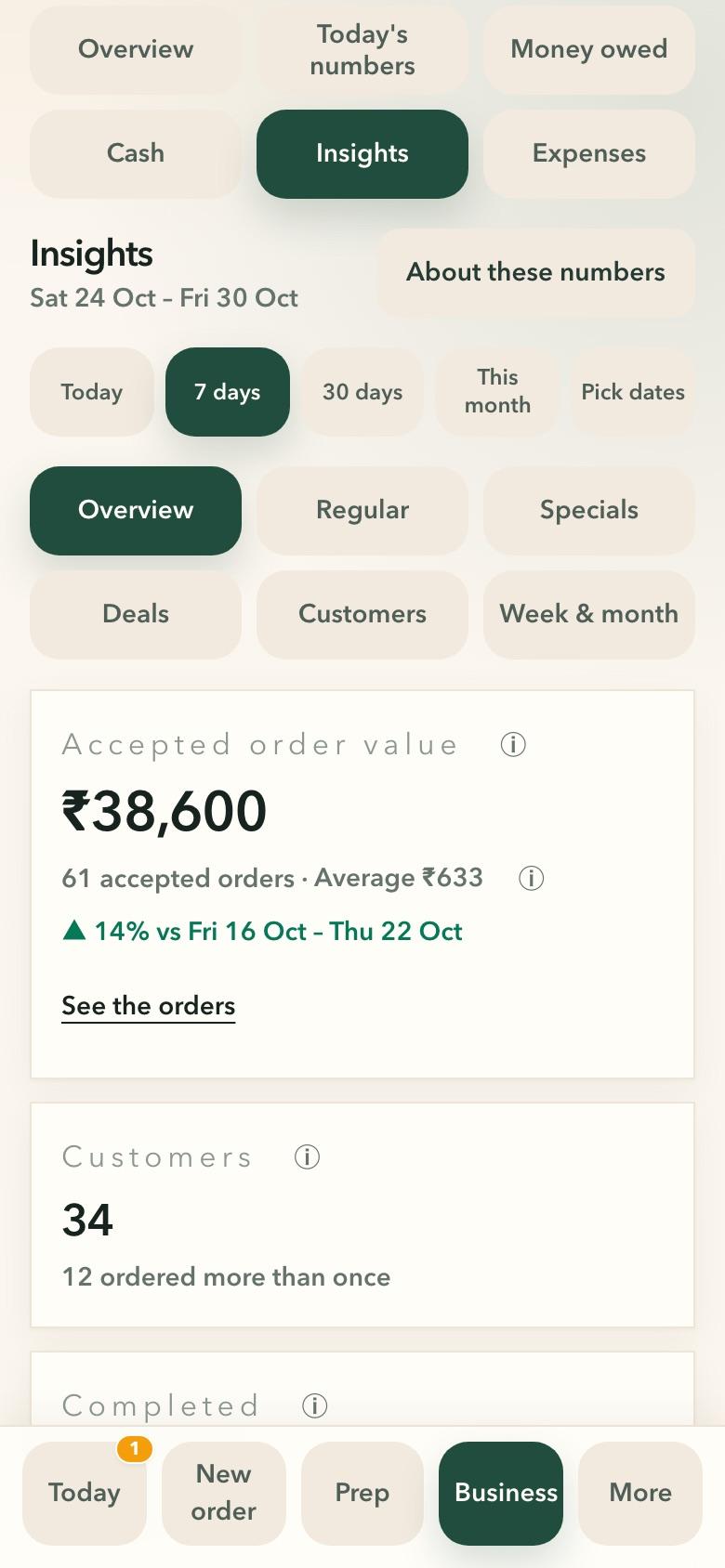
  • Business Insights: What you sold, how many customers ordered, popular dishes, how each Special and Deal did, how much discount you gave, and how much is still owed.
More details
  • Daily review: Orders, revenue, payment mix, and exceptions at a glance.
  • Reports: Performance, dues, and collections with export when you need it.
ChefSathi Business Insights on a phone: a demo kitchen's last 7 days — order value in rupees, orders, average order and customers
Business InsightsSales, orders, customers and what's working, for any dates.Demo kitchen · made-up data

How customers order and pay in India

How customers order

  • WhatsApp: Customers message your WhatsApp business number and get a secure link to your own ordering page.

How you get paid

  • UPI with screenshot check: Customers pay to your UPI ID and attach the screenshot; you check it against the order before it counts as paid.
  • Cash: Cash at the counter or on delivery, recorded against the order.

You check every payment; ChefSathi does not move or verify money on its own.

One platform, set up for how you sell

  • Daily menu kitchen

    Publish today, prep by delivery time, and stop copying WhatsApp into a notebook.

  • Home baker & home chef

    Fixed catalog, proof queue, and cash control from a real home kitchen setup.

  • Tiffin provider

    Plans, generated orders, skips, pauses, dues, and invoices in one place.

  • Catering-led owner

    Enquiry capture through to event orders and follow-up billing.

  • Multi-brand kitchen

    Separate menus and ordering pages from one kitchen, with one prep list and cash count. More than one brand or location is priced with you: contact us.

Try it with your own menu.

Not a marketplace and not a delivery app: your kitchen, your customers, your orders. Used every day in MindfullBelly's kitchen.